chromascope
 # Chromascope
**A lightweight GUI for reading and visualizing mzML mass spectrometry data**
[](https://www.rust-lang.org/)
[](LICENSE)
[]()
# Chromascope
**A lightweight GUI for reading and visualizing mzML mass spectrometry data**
[](https://www.rust-lang.org/)
[](LICENSE)
[]()
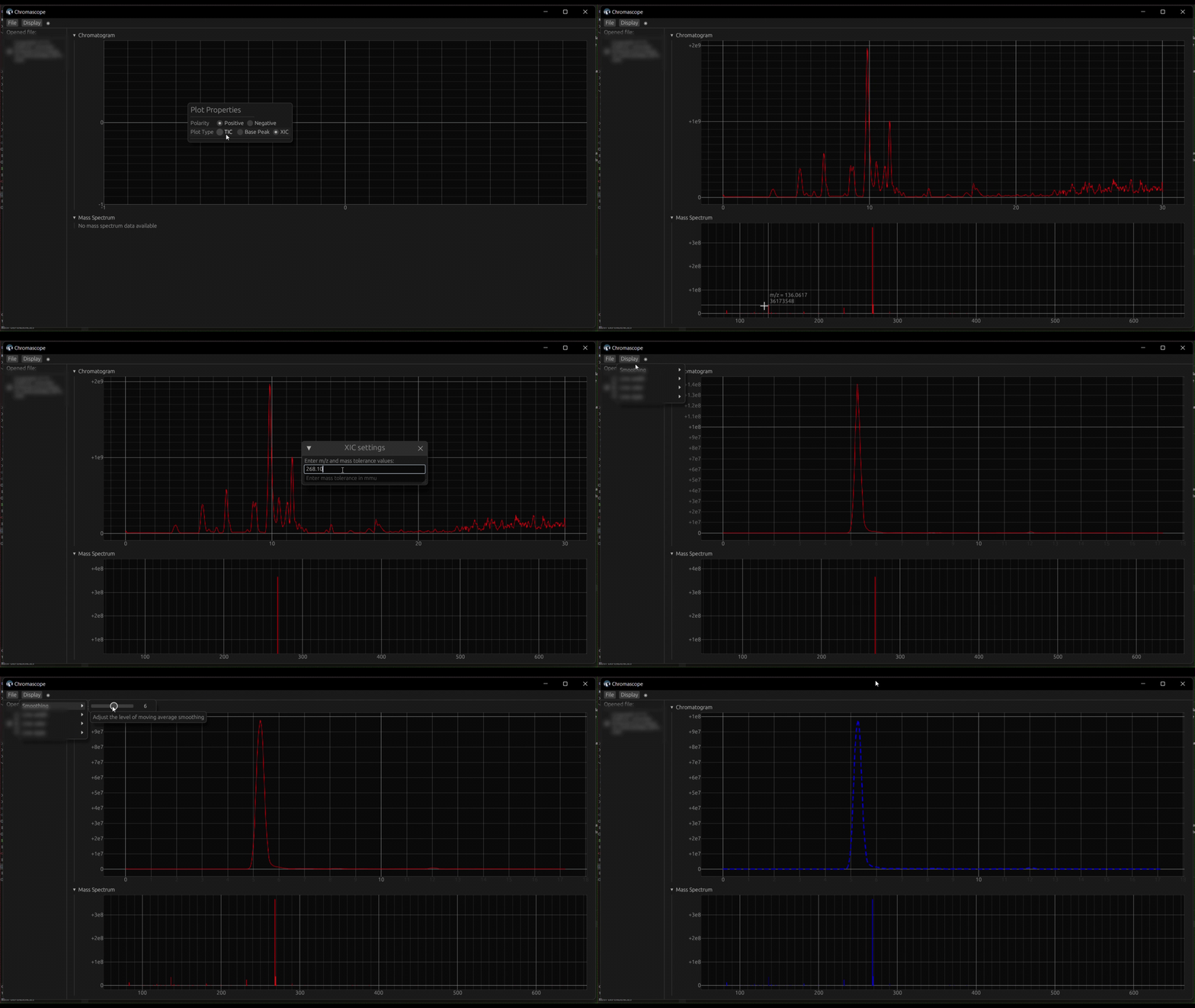
Why Chromascope?
mzML is an open, XML-based format widely used for storing and processing mass spectrometry data. While vendor-specific tools handle proprietary formats well, finding a truly lightweight GUI that works seamlessly with mzML files remains surprisingly difficult.
Chromascope fills that gap by offering instant, no-setup inspection of your mass spectrometry data. The compiled binary is incredibly small (less than 5 MB on Windows), making it highly portable, fast, and perfect for smaller machines or low-resource environments.
Features & Interactive Controls
Chromascope is designed to be highly interactive and easy to use. Here is what you can do and how to do it:
- Native mzML & Multi-file support: Load and compare multiple
.mzMLfiles simultaneously. Simply use theFilemenu to load them in parallel. - View Mass Spectra: Double-click anywhere on a chromatogram to extract and display the mass spectrum for that specific retention time.
- Peak integration: Right-click and drag across a peak on the chromatogram to perform a trapezoidal area integration.
- Trace Extraction (TIC, BPC, XIC): Switch between Total Ion Chromatogram, Base Peak Chromatogram, and Extracted Ion Chromatogram modes. Right-click the chromatogram to open Plot Properties and select your desired trace.
- Advanced filtering: Filter your mass spectrometry data by MS level (e.g., MS1 vs MS2), polarity, precursor m/z, and specific m/z ranges directly from the Plot Properties menu.
- Customizable display: Personalize how your data is presented by adjusting line color, style, smoothing, and line width via the
Displaymenu. - Cross-platform: Runs as a standalone executable on Windows, macOS, and Linux without needing an installer.
Usage
- Launch Chromascope:
- Run the application by executing the binary or running
cargo runfrom the project directory.
- Run the application by executing the binary or running
- Open mzML Files:
- Use the
Filemenu to load one or more mzML files into Chromascope.
- Use the
- Explore Data:
- Switch between TIC, BPC, and XIC modes using the Plot Properties. Use the interactive controls (double-click, right-click drag) to extract a corresponding mass spectrum or integrate a peak area.
- Customizing Views:
- Adjust the display settings via the
Displaymenu to customize how your data is presented.
- Adjust the display settings via the
Installation
Downloading pre-built binaries
You can download pre-built binaries for your operating system from the Releases page.
Building from source
To build Chromascope from source, follow these steps:
- Clone the Repository:
git clone https://github.com/adamcseresznye/chromascope.git cd chromascope - Build the Application:
cargo build --release - Run the Application:
./target/release/chromascope
Contributing
We welcome contributions to Chromascope! If you have suggestions for new features, bug reports, or would like to contribute code, please open an issue or submit a pull request. For the contribution guidelines see here.
License
Chromascope is licensed under the GPL-3.0 License. See the LICENSE file for more details.
Acknowledgements
The project would not have been possible without these excellent libraries: